By ChargeRFID
Review method: This organization-authored article reflects ChargeRFID's manufacturing perspective. Confirm chip, reader, charger, and backend compatibility in your own environment before ordering.
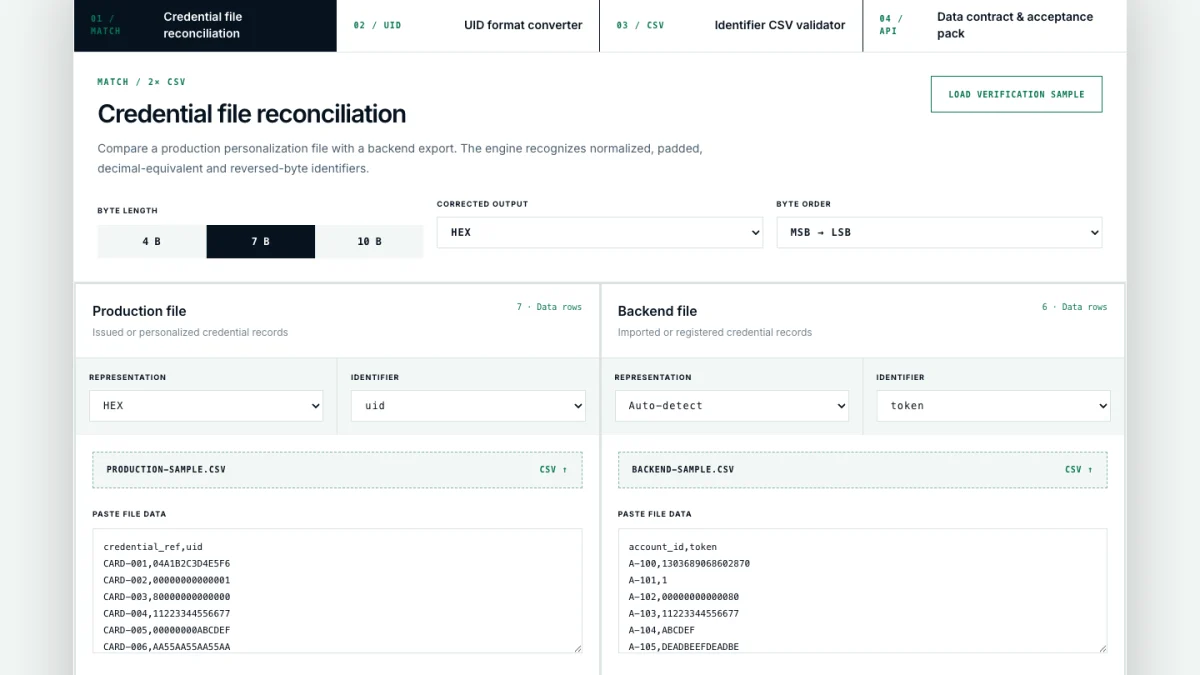
A credential batch can be correct at the factory and still be unusable in a charging backend. The identifier may be present in both systems, yet one file stores it as hexadecimal, another as decimal, one drops leading zeroes, or a reader reverses the byte order. A visual check rarely catches these differences across thousands of records.
We built the free ChargeRFID Engineering Console to make that handoff test repeatable. Its new reconciliation workspace compares the production or personalization file with a backend export directly in the browser and explains why every record did or did not match.
Why credential files fail to match
Two identifiers can represent the same underlying value while looking completely different. A seven-byte UID may arrive as fourteen hexadecimal characters, a long decimal integer, a shortened hexadecimal value without leading zeroes, or a byte-reversed string. Ordinary spreadsheet lookups treat all four as unrelated text.
The reverse problem also occurs: duplicate rows can appear valid until two credentials compete for one backend record. Missing production identifiers, obsolete backend tokens, invalid characters and values of the wrong length create additional failure modes.
What the reconciliation tool checks
Load or paste two CSV or TXT files: the issued production data and the imported backend data. The console detects common delimiters, proposes the likely identifier column and supports 4-, 7- and 10-byte credentials. You can keep automatic representation detection or identify a column explicitly as HEX or DEC.
The matching engine then separates results into four evidence classes:
Anything that cannot be paired safely stays visible as missing, extra, duplicate, invalid or ambiguous. The engine enforces one-to-one matching, so one backend row cannot silently satisfy multiple production rows.
Three outputs for the handoff
The console produces three downloadable CSV files. The exception report is the work queue for unresolved records. The match evidence records both row numbers, both original values, the match method and the canonical hexadecimal identifier. The corrected import contains unique, valid production identifiers that are missing from the backend, formatted as HEX or DEC and in the selected byte order.
The corrective file does not silently delete additional backend records. Those remain exceptions for an operator to review, because deletion should be a deliberate system decision.
A practical acceptance workflow
This is useful before a first issuance, during a platform migration, after a bulk replacement, or whenever a CPO, eMSP and manufacturer need one shared record of what was delivered and what was registered.
Privacy and technical scope
All parsing and comparison run locally in the browser. ChargeRFID does not upload or store the file contents. The tool reconciles data files; it does not connect to a physical reader or charging backend, and it does not replace end-to-end testing with finished credentials.
Open the free reconciliation tool and load the included verification sample to see every match class. For a production programme, request finished samples or send us the data contract you need to validate.
Company, network and product names referenced in this article are the trademarks of their respective owners. They are used descriptively to identify systems our cards interoperate with. ChargeRFID is an independent manufacturer and this article does not assert any affiliation, partnership or endorsement.
Next step
Turn the research into a card specification.
Share the reader, chip, data or rollout context and we will identify the decisions required for samples and production.
Continue reading
Related Articles
RFID Cards for EV Charging: How They Work and How to Choose One
What an RFID card for EV charging actually does, how it authenticates against OCPP stations and roaming hubs, the chip technologies used, and how to choose the right card for fleets, networks, or personal use.
White-Label RFID Cards for E-Mobility Service Providers: The eMSP Playbook
An e-mobility service provider lives or dies by the moment a driver taps a card at a stranger's charger and it just works. Here is how white-label RFID cards, OCPI tokens, and clean UID provisioning let an eMSP put its brand on a credential that roams across hundreds of thousands of charge points.